Choosing and Manipulating the Content and Effects
Choosing the Content and Effects
Content and Effects are chosen from your Library, via the Zone Composer window. If your library is empty, see Importing and Exporting Content to learn how to import the Factory Content as well as your own Content.
The process can be graphical, or done via the Channel Visualization/Encoder wheels. Here's how to use the graphical interface:
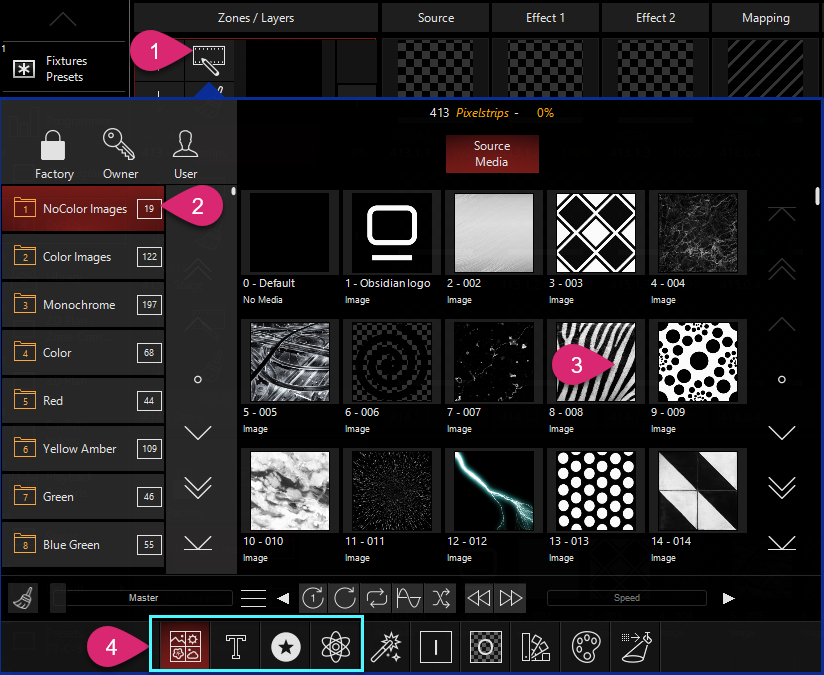
- Press the "pencil" icon to pop up the Zone Parameters.
- Choose the folder from the options on the left. By default you are browsing the Factory Content, though you may browse the Owner/User content using the icons above.
- Press any piece of content to choose it.
- You can navigate between types of content at the bottom of the pop-up.
As mentioned above, all of these parameters are located within the parameter groups on the Channel Visualization and encoders. Content selection is located under for the Source, Effect 1, and Effect 2 slots.
Manipulating the Content and Effects
Once a Source content is chosen, Effects can be stacked on top and each slot can be modified. Settings particular to each type of content are available via the menu icon in the middle pane of the Zone Parameters:
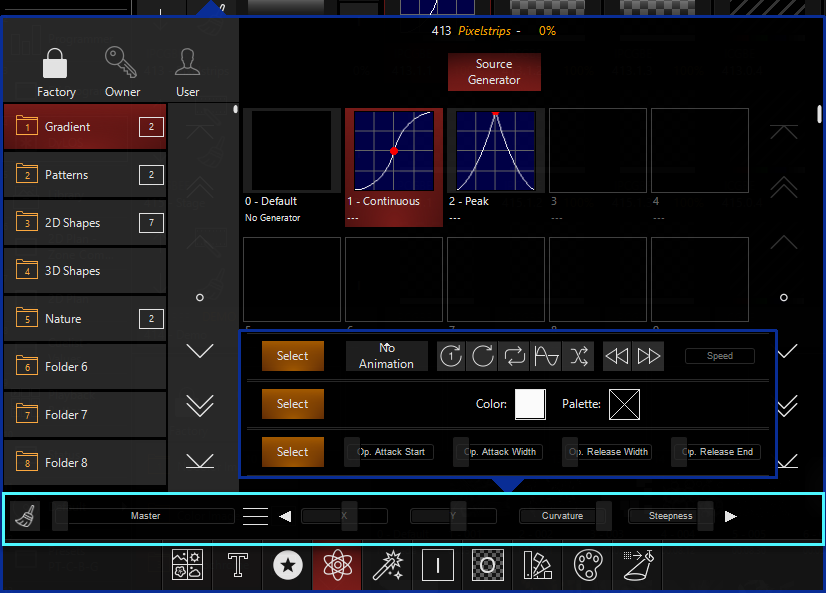
Pressing the menu icon (represented by 3 short vertical lines) allows you to see all of the available options and press the amber button to feature that set of parameters on the mid-section.
The left and right arrows in this section can be used to cycle through the groups of options as well.
Effects and Masks can also be used in the different Effect slots to modify the output.
Now, let's use Animation to make our DyLOS content more moving!